Zend Studio is a fantastic PHP dev tool. I've used it for years and they keep making it better. It's built on top of Eclipse so it can be used as a plugin. I have it set up this way so I can work on my PHP API and Android client in the same tool.
It's on sale now for a limited time. Not sure when the sale ends, but it's totally worth picking up.
Monday, August 26, 2013


Friday, August 2, 2013
Javascript / IE8 : file fields created by javascript allows text entry
I ran into an issue in IE8 while creating file fields in javascript for a form. The newly created file field allowed text entry. It didn't matter if I used jQuery or created the field with createElement.
When the field was placed on the screen it allowed users to enter text. This isn't a huge issue, but this shouldn't happen. It doesn't happen when you create the file field through HTML. You can see an example here.
The solution to this problem is cloning the newly created field before appending it to the DOM.
This will make it behave like a normal file field. You can see an example here.
$
var fileField = $('',{
            'id': 'picker-2',
            'type': 'file'});

            $('#fields').append(fileField);
When the field was placed on the screen it allowed users to enter text. This isn't a huge issue, but this shouldn't happen. It doesn't happen when you create the file field through HTML. You can see an example here.
The solution to this problem is cloning the newly created field before appending it to the DOM.
var fileField = $('',{
            'id': 'picker-2',
            'type': 'file'});

$('#fields').append(fileField.clone());
This will make it behave like a normal file field. You can see an example here.
Thursday, July 18, 2013
Sencha Touch: Using the Action property of the Button element
I've been trying to wire up the buttons in my UI to handlers inside the view so I could have them fire an event to the controller and complete an action, but it required me to put a function in the config section and it looks messy and isn't portable.
After much googling I found a hidden property of Button called action. I can't find very good documentation on it and wanted to show an example of it because it will make your life so much easier.
This saved me quite a few steps because all my button actions triggered something in the controller. This way I can skip using fireEvent and just tie the event to a handler method in the controller.
After much googling I found a hidden property of Button called action. I can't find very good documentation on it and wanted to show an example of it because it will make your life so much easier.
// Building a button inside of an items array
{
    xtype: 'button',
    action: 'warnOnLeave',
    align: 'left',
    iconCls: 'home',
    ui: 'back',
}

// Handle the button click inside a controller
control: {
    // Listen for the new button press
    'button[action=warnOnLeave]':{
        tap: 'onCreateNewContent'
    }
}
This saved me quite a few steps because all my button actions triggered something in the controller. This way I can skip using fireEvent and just tie the event to a handler method in the controller.
Sencha Touch: Center elements in a tab panel
By default elements in Ext.tab.Panel are aligned left. I wanted to center them so it's not so close to the back button in the Title Bar.

I found the answer while digging around in the comments section of the Sencha Touch documentation and wanted to surface the answer so others could easily find it.
This will center the elements.
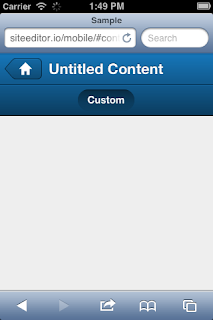
Here is the documentation for centering elements on a panel.

I found the answer while digging around in the comments section of the Sencha Touch documentation and wanted to surface the answer so others could easily find it.
Ext.define("Sample.view.ContentEditorContainer",{
    extend: 'Ext.tab.Panel',
    alias: 'widget.contenteditorcontainer',

    config: {
        // How to center tabs in a panel floating at the top
        tabBar: {
            layout: {
                type: 'hbox',
                align: 'center',
                pack: 'center'
            }
        },
This will center the elements.

Here is the documentation for centering elements on a panel.
Wednesday, July 17, 2013
Tep Wireless Sale: 50% off
I used a tep internet hotspot on my last vacation and the it worked really well. I highly recommend it to anyone going on an overseas trip.
They're having a 50% off sale right now. The coupon code is “FireSale”.
They're having a 50% off sale right now. The coupon code is “FireSale”.
Friday, July 12, 2013
Objective C : Learning the syntax
I'm in the process of trying to learn Objective-C. In the beginning this can be really rough. There are so many brackets. So many brackets...
This site has been pretty helpful in trying to make some sense out of the chaos:
http://cocoadevcentral.com/d/learn_objectivec/
This is the video course I'm learning from: Coding Together: Developing Apps for iPhone and iPad (Winter 2013). It's really good, better than most books I've read and it's free.
Programming iOS 6 however has been a fantastic book and explains obj-c in great depth. You'll need at least a basic understanding of either C or C++. Other books have you blindly follow code examples without explaining anything. This book tells you exactly what's going on. I wish more books were written in this fashion.
There's lot of other stuff obj-c does that seem auto-magical. Like the variables that are created from that are prefixed with an _. It's all about comments you guys.
This site has been pretty helpful in trying to make some sense out of the chaos:
http://cocoadevcentral.com/d/learn_objectivec/
This is the video course I'm learning from: Coding Together: Developing Apps for iPhone and iPad (Winter 2013). It's really good, better than most books I've read and it's free.
Programming iOS 6 however has been a fantastic book and explains obj-c in great depth. You'll need at least a basic understanding of either C or C++. Other books have you blindly follow code examples without explaining anything. This book tells you exactly what's going on. I wish more books were written in this fashion.
There's lot of other stuff obj-c does that seem auto-magical. Like the variables that are created from that are prefixed with an _. It's all about comments you guys.
Sencha Touch: Ext version of jQuery methods
I'm trying to use as many native parts of Ext as I can without leaning on other libraries. It's not so much that I wouldn't use the other libraries anyway, but it's better to embrace change. There's a lot of useful stuff that Underscore handles really well.
Monday, July 8, 2013
Sencha Touch: Disable script caching
While working on a Sencha Touch project I needed to look in one of the core sencha files. The problem is there is a _dc property attached to every script it brings in. It's great for making sure your code isn't cached, but terrible for debugging.
After a big of digging I found the code needed to turn off caching. Open up the app.js file and look at the very top. You should see a Ext.Loader.setPath method. Update it to look like this and caching should now be disabled.
After a big of digging I found the code needed to turn off caching. Open up the app.js file and look at the very top. You should see a Ext.Loader.setPath method. Update it to look like this and caching should now be disabled.
Ext.Loader.setPath({
    'Ext': 'touch/src',
    'Sample': 'app'
}).setConfig({
    disableCaching: false
});
Monday, April 8, 2013
Opensource version of maxgif.com
Once google made searching for gifs possible I lost almost an entire day just looking for corgi gifs. This led to making a site that showed blown up versions of the gifs. It's the same thing as maxgif.com (nsfw). I wanted to set this up so anyone could do the same thing. I put the code up on github.com so others can check it out.
Have fun. Put a link in the comments if you used it somewhere.
Have fun. Put a link in the comments if you used it somewhere.
Subscribe to:
Posts (Atom)