I was looking through the ActionScript 3.0 Cookbook today and started experimenting with the URLLoader class. The example on page 437 talks about setting the format for the incoming URL. When setting the dataFormat property of URLLoader it suggests using the constant called DataFormat. The only problem is this constant doesn't exist. It's a typo.
The real value is called URLLoaderDataFormat. You can read more about it here.
Tuesday, October 13, 2009


Sunday, October 11, 2009
PHP: Creating your own custom ini config file
In a continuing effort to make my life more difficult I've decided to write my own MVC. I could have easily used one of many frameworks(Zend Framework, Cake, Symfony, etc ...) but I was really interested in what it takes to write one. So far it's been a great experience and I've learned a lot about PHP5.
One of the things I noticed about a lot of the MVCs is they store settings in an external ini file. I had no idea how they pulled the information out of them until I ran across this article on IBM's website. They mentioned a function called parse_ini_file. This function has been around since PHP4, but I never knew about it. You could fill the grand canyon with the things I don't know, but let's focus on this for now.
This function allows you to read a external ini file and it returns an array of properties. You can also configure it to return an associative array of values grouped by category.
This allowed me to move a lot of settings into an external file and clean up a huge chunk of code. The problem is many of the variables I defined were dynamic. parse_ini_file doesn't evaluate external PHP code. The trick to that is to run eval on things you want it to parse.
Here is an example of some code I have stored in an external file.
I created a function that will parse the ini file and will run eval on anything in the define group.
The important part to note when using eval is that it doesn't return a value. If you want to capture the evaluated variable prefix the variable with "return" and make sure to end the line with a ;.
Update
An important thing to note is that ini files can be read very easily in a web browser. You'll want to set up a .htaccess file that blocks viewing of ini files. You can copy-paste this into a .htaccess file at the root of your site.
One of the things I noticed about a lot of the MVCs is they store settings in an external ini file. I had no idea how they pulled the information out of them until I ran across this article on IBM's website. They mentioned a function called parse_ini_file. This function has been around since PHP4, but I never knew about it. You could fill the grand canyon with the things I don't know, but let's focus on this for now.
This function allows you to read a external ini file and it returns an array of properties. You can also configure it to return an associative array of values grouped by category.
This allowed me to move a lot of settings into an external file and clean up a huge chunk of code. The problem is many of the variables I defined were dynamic. parse_ini_file doesn't evaluate external PHP code. The trick to that is to run eval on things you want it to parse.
Here is an example of some code I have stored in an external file.
[define]
PATH_HTTP = "http://{$_SERVER['HTTP_HOST']}/test_site/"
I created a function that will parse the ini file and will run eval on anything in the define group.
//configure define. this will parse php code
if(isset($ini['define']))
{
  foreach($ini['define'] as $key=>$item)
  {
    define($key, eval("return \"{$item}\";"));
  }
}
The important part to note when using eval is that it doesn't return a value. If you want to capture the evaluated variable prefix the variable with "return" and make sure to end the line with a ;.
Update
An important thing to note is that ini files can be read very easily in a web browser. You'll want to set up a .htaccess file that blocks viewing of ini files. You can copy-paste this into a .htaccess file at the root of your site.
<files *.ini>
order allow,deny
deny from all
</files>
Thursday, October 8, 2009
Javascript: Adding options to a select element
I've started working with javascript more and more now. I'm leaning away from using innerHTML and started creating the objects instead. As with anything javascript related Internet Explorer will cause more problems than solutions.
When you're creating a new option element that will be added to a select element IE wants to do it one way while everyone else can handle it another way. I'll show the first way I tried to tackle it, and then show the cross browser way to handle it.
I set up a try, catch block that would try IE first. If an error occurred it would fall back to the second method that works in most browsers.
Internet Explorer wants to place the value inside of the createElement method while other browsers can handle the assignment on the object property. Also IE wants the text added with createTextNode. It's a pain to have two methods for something so simple. After a bit of experimentation and research I have a method that works for all browsers.
This is much cleaner and easier to maintain. setAttribute is also a handy method for assigning non standard properties to an object. Some client-side form validation scripts want to add proprietary properties to a tag. Using setAttribute is the easiest way to create them.
When you're creating a new option element that will be added to a select element IE wants to do it one way while everyone else can handle it another way. I'll show the first way I tried to tackle it, and then show the cross browser way to handle it.
I set up a try, catch block that would try IE first. If an error occurred it would fall back to the second method that works in most browsers.
//IE code
try
{
  obj_option = document.createElement('<option value="test value"/>');
  obj_text = document.createTextNode("option text value");
  obj_option.appendChild(obj_text);
}
//everyone else
catch(e)
{
  var obj_option = document.createElement('option');

  obj_option.text = "option text value";
  obj_option.value = "test value";
}
Internet Explorer wants to place the value inside of the createElement method while other browsers can handle the assignment on the object property. Also IE wants the text added with createTextNode. It's a pain to have two methods for something so simple. After a bit of experimentation and research I have a method that works for all browsers.
var obj_option;
var obj_text;

obj_option = document.createElement('option');
obj_text = document.createTextNode("option text value");
obj_option.appendChild(obj_text);
obj_option.setAttribute("value", "test value");
This is much cleaner and easier to maintain. setAttribute is also a handy method for assigning non standard properties to an object. Some client-side form validation scripts want to add proprietary properties to a tag. Using setAttribute is the easiest way to create them.
Sunday, October 4, 2009
Zend Studio 6.1: SVN update on Snow Leopard
I ran into an issue with a svn project today so I decided to create a new repository. The thing I didn't realize is that SVN has been upgraded to version 1.6.2 in Snow Leopard. This caused a major conflict with Zend Studio 6.1. When I tried to browse the repository with a project import it couldn't read the SVN tree.
After a lot of searching I figured out how to update the SVN plug-in.
Goto Help => Software Updates => Find and Install.
Select Search for updates of the currently installed features and click Finish.
When the search finishes check "Subversive update site 2.0.x".
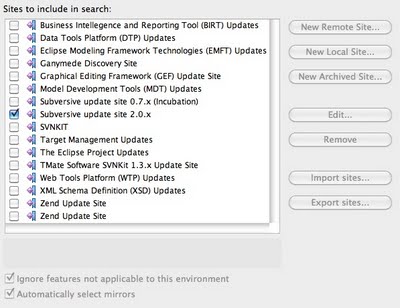
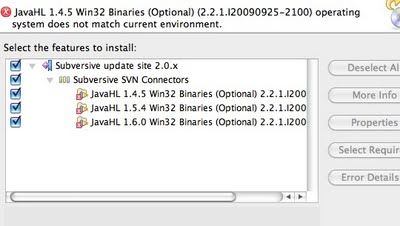
Click the "Search" button. There should be an option listed called "Subversive update site 2.0.x". If you check the box you will get an error on a JavaHL 1.4.5 Win32 Binaries (Optional). Click the arrow to the left of to expose more options. Click the arrow to the left of "Subversive SVN Connectors" and uncheck all the JavaHL Win32 Binaries. This should allow you to install the new update.
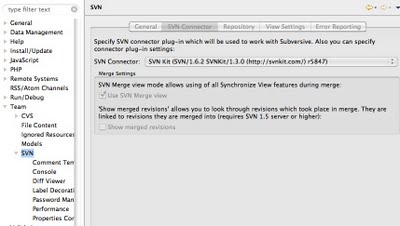
When the update has finished Zend will prompt you to allow a restart. Once it closes you will have to restart it. You'll need to select the new SVN plugin. Goto Zend Studio for Eclipse => Preferences. Goto Team => SVN. Click the SVN Connector tab and select "SVN Kit (SVN/1.6.2 SVNKit/1.3.0)" from the SVN Connector down down.
You should be able to import a project from a new version of SVN without a problem.
Update 10/05/2009
I may have left out a key piece of resolving the SVN issue. I was trying many things at the time, and this might be one of the parts that made it work.
There is a new version of the SVNKit plug-in for eclipse. I don't have the exact steps at this moment to install them in Zend Studio, but the site has the steps for Eclipse and they're pretty close. You can view them here.
After a lot of searching I figured out how to update the SVN plug-in.
Goto Help => Software Updates => Find and Install.
Select Search for updates of the currently installed features and click Finish.
When the search finishes check "Subversive update site 2.0.x".

Click the "Search" button. There should be an option listed called "Subversive update site 2.0.x". If you check the box you will get an error on a JavaHL 1.4.5 Win32 Binaries (Optional). Click the arrow to the left of to expose more options. Click the arrow to the left of "Subversive SVN Connectors" and uncheck all the JavaHL Win32 Binaries. This should allow you to install the new update.

When the update has finished Zend will prompt you to allow a restart. Once it closes you will have to restart it. You'll need to select the new SVN plugin. Goto Zend Studio for Eclipse => Preferences. Goto Team => SVN. Click the SVN Connector tab and select "SVN Kit (SVN/1.6.2 SVNKit/1.3.0)" from the SVN Connector down down.

You should be able to import a project from a new version of SVN without a problem.
Update 10/05/2009
I may have left out a key piece of resolving the SVN issue. I was trying many things at the time, and this might be one of the parts that made it work.
There is a new version of the SVNKit plug-in for eclipse. I don't have the exact steps at this moment to install them in Zend Studio, but the site has the steps for Eclipse and they're pretty close. You can view them here.
Thursday, October 1, 2009
Flex: New Classes won't import into a project from a library
I ran into an issue while working on a Flex project where a new class I created in a Library wouldn't import, or auto-complete in the working project. It was also throwing a few different errors.
This was displayed at Runtime:
Variable xxx is not defined.
This was displayed in the Problems window:
Access of undefined property xxx.
Sometimes Flex doesn't update the Build Path to include new classes. If you run into this issue you can check to see if everything in your project is included in the Build Path.
Right-click on your Library project and goto Properties. Select "Flex Library Build Path" on the left and look in the Classes tab on the right. Scroll through the list to make sure everything is selected. If you're getting the errors above there is more than likely something in the list that isn't checked.

This was displayed at Runtime:
Variable xxx is not defined.
This was displayed in the Problems window:
Access of undefined property xxx.
Sometimes Flex doesn't update the Build Path to include new classes. If you run into this issue you can check to see if everything in your project is included in the Build Path.
Right-click on your Library project and goto Properties. Select "Flex Library Build Path" on the left and look in the Classes tab on the right. Scroll through the list to make sure everything is selected. If you're getting the errors above there is more than likely something in the list that isn't checked.

Friday, September 25, 2009
Flex / ActionScript: Debugging
I ran into an issue while working on a project in flex. I was trying to figure out why something wasn't working and had a large amount of trace calls in my code. It was a complete pain to remove them all. This lead me to develop a debug class that I can turn off at a page level or you can turn if off in the class. It's a first draft. I'd like to make it a Singlton so I can turn it off for the whole project at a page level, but that's for later.
Using the class is simple. First create an instance of the class and tell if wither you want it on and what the name of the script you're calling it from is named.
To turn off debugging for the script just set the first parameter to false. To turn it off for the whole project change the class variable _turnOffDebug to true;
Use the log method to display your statement in the debug area of flash or flex.
This is a what the trace statement should look like.
[Fri Sep 25 15:03:21 GMT-0700 2009]main.mxml: debug statement
If you have any feedback please send me a message.
package
{
public class Debug
{
private var _displayDebug:Boolean = false;
private var _incomingClass:String = "";
private var _logArray:Array = [];

//to stop all debugging set this to false
private var _turnOffDebug:Boolean = false;

/**
* Create the debug object
* @param display
* @param fileName
*
*/
public function Debug(display:Boolean, fileName:String): void {
_displayDebug = display;
_incomingClass = fileName;
}


/**
* Display a trace message
* @param msg
*
*/
public function log(msg:String) : void {
//override anything a debug passes in
if(_turnOffDebug) {
return;
}

if(!_displayDebug) {
return;
}

var logMessage:String = "["+ new Date() +"]" + _incomingClass + ": " + msg;

trace(logMessage);
_logArray.push(logMessage);
}
}
}
Using the class is simple. First create an instance of the class and tell if wither you want it on and what the name of the script you're calling it from is named.
var debugObj:Debug = new Debug(true, 'main.mxml');
To turn off debugging for the script just set the first parameter to false. To turn it off for the whole project change the class variable _turnOffDebug to true;
Use the log method to display your statement in the debug area of flash or flex.
debugObj.log('debug statement');
This is a what the trace statement should look like.
[Fri Sep 25 15:03:21 GMT-0700 2009]main.mxml: debug statement
If you have any feedback please send me a message.
Tuesday, September 22, 2009
Snow Leopard (10.6): Show the month and day in the menu bar
Snow Leopard(10.6) has a new option for Date & Time in System Preferences. You can now have the day, month and day of the month show in the menu bar. You could do this before, but it required a bit of hacking in the International section.
Goto System Preferences and select Date & Time. Click the Clock tab and check "Show the day of the week".

Your menu bar should look something like this now.

Goto System Preferences and select Date & Time. Click the Clock tab and check "Show the day of the week".

Your menu bar should look something like this now.

Saturday, September 19, 2009
PHP: Simple register_globals workaround
Working with an old php4 project in php5 can expose some bad programming practices and create bugs. The first problem is relying on register_globals. I don't want to turn this on because it injects variables into the page scope. I also don't want to update the whole project to not rely on it.
The simple way around this is to write something that injects the variables into the project scope. This function will read all the variables from the url and inject them into the project scope. You should never rely on register_globals, but if you don't want to update old code this is an easy workaround.
The simple way around this is to write something that injects the variables into the project scope. This function will read all the variables from the url and inject them into the project scope. You should never rely on register_globals, but if you don't want to update old code this is an easy workaround.
function register_globals()
{
  //if register_globals is on then return
  if(ini_get("register_globals")) return;

  //inject URL vars into scope
  foreach($_REQUEST as $key=>$item)
  {
    $GLOBALS[$key] = $item;
  }
}
MAMP (Pro): Making changes to php.ini
I'm using MAMP Pro and trying to get an old project built in PHP4 up and running. The project depends on register_globals to be turned on. I tried to update the php.ini file located in MAMP/conf/php4/php.ini, but nothing would change when I looked at the phpinfo() output.
After banging my head against the wall for awhile I turned to the forums at mamp.info. There is an importance difference between MAMP and MAMP PRO. If you want to update any of the ini file settings while using MAMP PRO goto File => Edit Template and select the ini you want to update.
The full forum post can be found here.
After banging my head against the wall for awhile I turned to the forums at mamp.info. There is an importance difference between MAMP and MAMP PRO. If you want to update any of the ini file settings while using MAMP PRO goto File => Edit Template and select the ini you want to update.
The full forum post can be found here.
Friday, September 18, 2009
Flash / ActionScript: String padding (leading zero)
I was working on a date/time format in Flash and needed a way to pad values out so they always took up the same amount of space. For example making sure a month always has two digits. Making sure it displays a "05" instead of "5". I couldn't find anything built into AS2 or AS3 to do this so I wrote something that would. It allows you to pass in a value and pad either the left or right side up to a given amount of characters.
This function accepts an object that can be converted to a string with the toString method, the character you want to use for padding, the final length of the string and wither you want it padded on the left or right side using the character "l" or "r".
For example if you have a number you want padded with three 0 so the final outcome will look like "0005" you would call the function like this.
If you want to use this in FLEX you might want to type the parameters on the function and give it a return value.
/**
* This function will pad the left or right side of any variable passed in
* elem [AS object]
* padChar: String
* finalLength: Number
* dir: String
*
* return String
*/
function padValue(elem, padChar, finalLength, dir)
{
  //make sure the direction is in lowercase
  dir = dir.toLowerCase();

  //store the elem length
  var elemLen = elem.toString().length;

  //check the length for escape clause
  if(elemLen >= finalLength)
  {
    return elem;
  }

  //pad the value
  switch(dir)
  {
    default:
    case 'l':
      return padValue(padChar + elem, padChar, finalLength, dir);
      break;
    case 'r':
      return padValue(elem + padChar, padChar, finalLength, dir);
      break;
  }
}
This function accepts an object that can be converted to a string with the toString method, the character you want to use for padding, the final length of the string and wither you want it padded on the left or right side using the character "l" or "r".
For example if you have a number you want padded with three 0 so the final outcome will look like "0005" you would call the function like this.
var exampleNumber:Number = 5;
padValue(exampleNumber, "0", 4, 'l');
If you want to use this in FLEX you might want to type the parameters on the function and give it a return value.
Subscribe to:
Posts (Atom)